Infrastructure Switching
Pillar 04 · Switching

The LAN that everything else rides on.

Switches are the boring, foundational layer everyone under-designs. Netcom sizes PoE budgets to the AP load, plans uplinks for the next five years, and builds L2/L3 fabrics that don't become the reason the whole network is slow.

4
platforms we design on — Catalyst 9000, Meraki MS, Aruba CX, FortiSwitch
90W
per-port UPOE+/PoE++ · PTZ cameras, Wi-Fi 6E APs, digital signage
7 yr
lifecycle planning on access switches — not a 3-year replace cycle
Switching · Catalyst Mid-Market
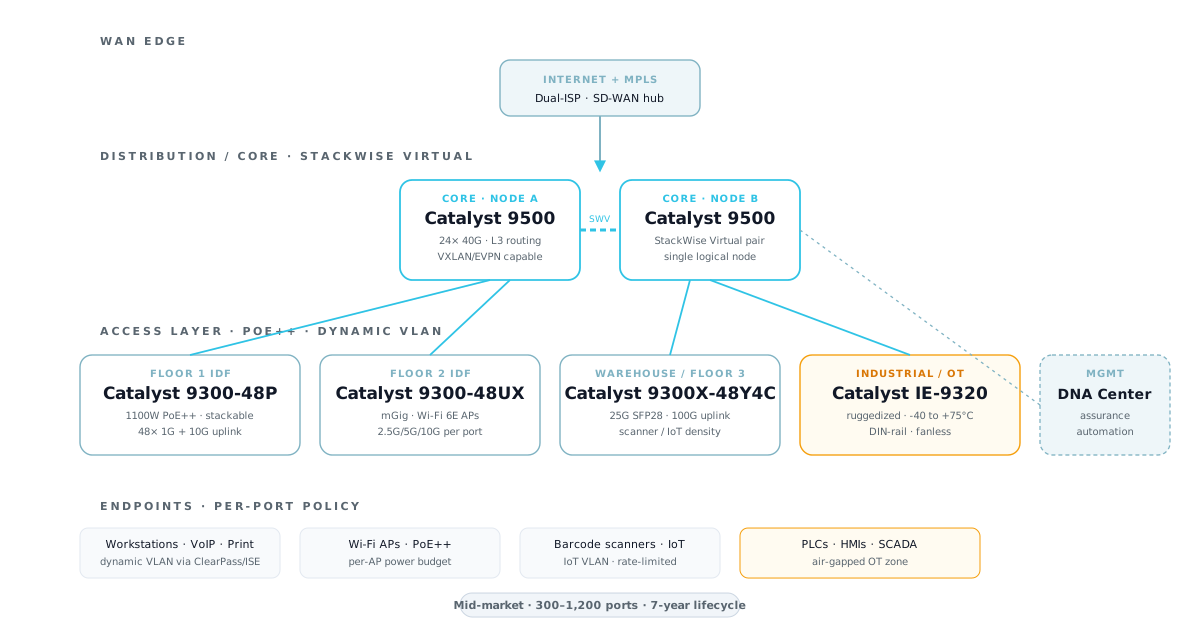
Cisco Catalyst 9500 StackWise Virtual core with 9300 access switches reference architecture
The Problem

Most switching refreshes solve the wrong thing.

The access switch is the most undervalued component in a campus network. When Wi-Fi is slow, the AP gets blamed. When VoIP cuts out, the phone gets blamed. The switch underneath — undersized PoE budget, oversubscribed uplink, no QoS queue for voice — is invisible on a BOM but is often the actual fault.

We also see the opposite failure mode: enterprises over-buy core switching to "future-proof," then spend seven years operating 30% of the capacity they paid for. The money should have gone into a properly specced access layer with real PoE++, mGig to every AP, and 10G/25G uplinks that match the real traffic shape.

Right-sizing switching means starting from the endpoint. Count PoE devices by power class, measure actual uplink utilization, project three years of growth, and then pick a platform. Netcom does this on every engagement — not because it's fancy, but because it's the only way to avoid buying either too much or too little.

Three tiers. Four vendor platforms we actually design on.

Each architecture is a production-tested topology. Use the tabs to match your scale and operating model.

Meraki MS Cloud-Managed Stack
Single-tier collapsed core/access on Meraki MS. PoE+ at the edge, 10G stackable uplinks, cloud-managed configuration. Best for single-building SMBs that want minimal on-site operations.
SMB · single building · 1–3 closets · <300 ports

Meraki MS — cloud-managed, zero-touch

Collapsed-core topology where the same platform handles aggregation and access. Physical stacking for redundancy and single-IP management, cloud-managed configuration with template push across sites, and PoE+ budgeted for Wi-Fi 6 APs and VoIP phones. Best fit for clinics, small offices, and retail stores where cloud-managed operations matter more than hand-crafted CLI.

RoleVendor & ModelNotesLicense
Collapsed core / distributionMeraki MS355-24X224× mGbE + 2× 40G · L3 routing · stackableEnterprise
Access · office / receptionMeraki MS125-48FP48× PoE+ · 740W budget · 10G SFP+ uplinkEnterprise
Access · conference / wireless-heavyMeraki MS225-48LP48× PoE+ · 370W · L3 liteEnterprise
Server / NAS closetMeraki MS225-2424× 1G non-PoE · quiet fanEnterprise

Which switching platform for which environment.

The recommendation depends on scale, operating model, PoE load, and existing vendor estate. Here's how Netcom thinks about it.

EnvironmentPrimaryAlternates
Single-site SMB · no network engineer on staffMeraki MS125 / MS225Aruba CX 6100 · FortiSwitch 100F
Multi-site retail · centralized config templateMeraki MSAruba Instant On · FortiSwitch
Mid-market campus · office + warehouse mixCisco Catalyst 9300Aruba CX 6300M
Fortinet-estate customer · one-vendor security fabricFortiSwitch 148F / 624F (FortiLink)Standalone L3 if more needed
Aruba-estate customer · ClearPass NACAruba CX 6300M / 8325Cisco Catalyst 9300
Industrial / OT · plant floor · ruggedizedCatalyst IE-9320 / IE-3400Aruba CX 4100i · FortiSwitch Rugged
Data center · spine-leaf · EVPNCisco Nexus 9000 / Aruba CX 8360Arista 7050 (via partner)
Enterprise campus · SD-Access fabricCatalyst 9600 + 9500 + 9300Aruba CX + NetEdit
Healthcare · HIPAA · dynamic segmentationCatalyst 9300 + ISE TrustSecAruba CX + ClearPass
Very tight budget · single closetFortiSwitch 148F · Meraki MS120Aruba CX 6000

What Netcom delivers

  • Port count and PoE budget derived from actual endpoint inventory, not generic "48-port per closet"
  • Uplink sizing based on measured utilization plus three-year growth projection
  • L2/L3 topology design · STP strategy · redundancy pattern · management VRF
  • VLAN plan · IP addressing · DHCP relay · QoS policy for voice, video, and IoT
  • NAC integration design with ISE / ClearPass / FortiNAC and dynamic VLAN rules
  • Stack / VSS / StackWise Virtual clustering design for failure-domain minimization
  • Staged deployment with pre-configured units shipped ready to rack
  • Optional managed service: 24/7 monitoring via our NOC partner with Netcom as your named engineer, firmware management, quarterly lifecycle review

Our design process

  • Endpoint inventory: count PoE devices by class (AP, phone, camera, signage, sensor)
  • PoE budget math per closet · verify 25%+ headroom for growth and simultaneous draw
  • Uplink measurement on existing network (if present) · peak and 95th percentile
  • Cable plant review · fiber availability · termination / splice requirements
  • Platform pro/con with operating-model weighting (cloud, on-prem, hybrid)
  • BOM with license tier justification · not every port needs DNA Advantage
  • Firmware / code version standardization plan · SWIM or template-based
  • Cutover plan per closet · rollback criteria · acceptance tests

Where switching design really matters.

PoE budgets, ruggedization, and stacking topology show up hardest in these verticals — where the switch is carrying cameras, phones, APs, locks, sensors, and HMIs at once.

Ready to size it correctly?

Send us your floorplan, endpoint counts, and current utilization stats (if available). We'll come back with a port-by-port BOM, PoE math, and a phased cutover plan.