Infrastructure Wireless · Wi-Fi 6 & 7
Pillar 03 · Wireless

Wi-Fi that holds up under load.

Most wireless problems are design problems. We start with a predictive Ekahau survey, validate on site with live measurements, and land on an AP count that's right for your floorplan — not an SKU count someone guessed off a walkthrough.

6 / 6E / 7
Wi-Fi generations we design on across Meraki, Aruba, Cisco Catalyst
Ekahau
predictive + on-site validation surveys on every engagement
-67 dBm
minimum target RSSI at every designed coverage point
Wireless · Aruba Mid-Market
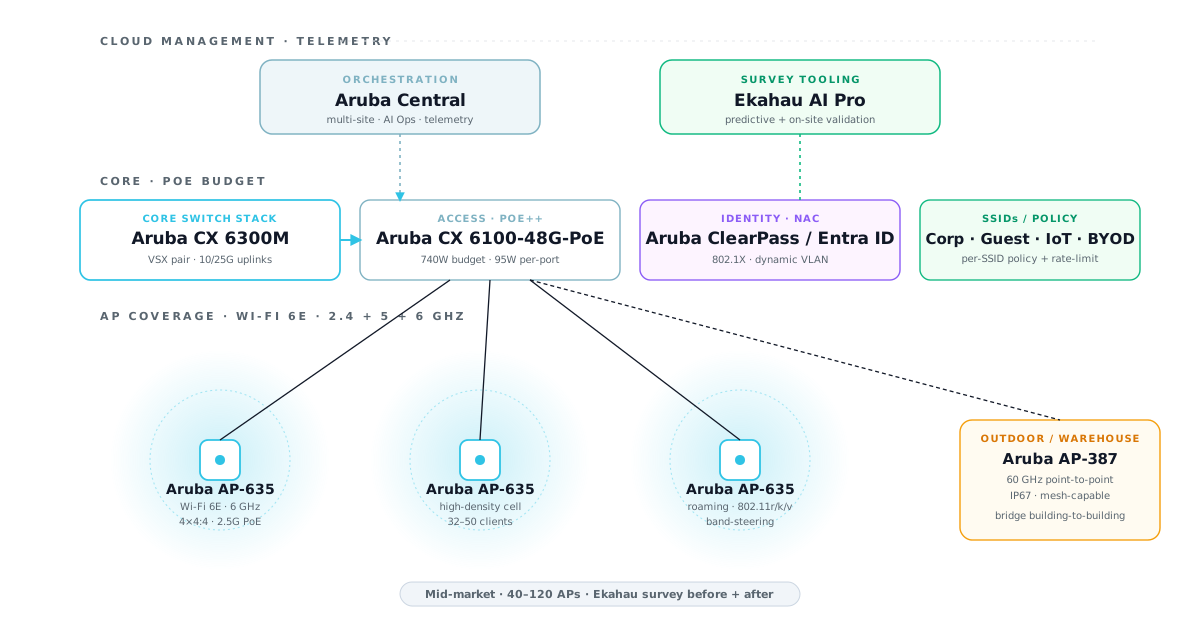
Aruba Central cloud-managed wireless reference architecture with Wi-Fi 6E APs and CX switches
The Problem

"More APs" is not a wireless strategy.

The most common wireless failure mode we see: a vendor walked the floor, eyeballed the ceiling tiles, and quoted an AP every 60 feet. Six months later, handoff drops kill VoIP calls, warehouse scanners lose association in the racks, and the operations team is rebooting APs at 2am.

The root cause is almost never the hardware. It's the design: wrong AP model for the ceiling height, channel plan that overlaps with the tenant next door, PoE budget that starves the radios under full load, or a controller architecture that can't scale past the first 50 clients per AP.

Good Wi-Fi starts with a predictive model and ends with a validation walk. Netcom designs on Ekahau for every multi-AP deployment — predictive heatmaps before procurement, on-site measurements after install, and a delivered coverage report you can hand to your auditor or your insurance carrier.

Three tiers. Three vendor platforms. Real AP models.

Each tier is a production-tested architecture. Use the tabs to match your environment.

Meraki MR Cloud-Managed Wi-Fi 6
Cloud-managed APs with zero-touch provisioning. Dashboard analytics, auto-RF optimization, multi-SSID with per-SSID VLANs. Best for organizations without dedicated network staff.
SMB · single site · 1–15 APs · <300 clients

Meraki MR — cloud-managed Wi-Fi 6

Cloud-managed access points with controller-less architecture. Zero-touch provisioning (APs ship pre-claimed), auto-RF channel and power tuning, client-facing analytics in the Meraki Dashboard, and a single license tier that includes firmware updates. Best fit for clinics, small offices, retail stores, and any environment where the IT team is one person wearing eight hats.

RoleVendor & ModelNotesLicense
Primary AP (offices)Meraki MR46Wi-Fi 6 · 4×4:4 · 3.5 Gbps aggregate · mGig uplinkEnterprise
Lower-density APMeraki MR36Wi-Fi 6 · 2×2:2 · low-ceiling offices · budget-friendlyEnterprise
Outdoor APMeraki MR76IP67 rated · Wi-Fi 6 · patio / loading dockEnterprise
PoE switchMeraki MS125-24P24× PoE+ · 370W budget · 10G uplinksEnterprise
Site surveyEkahau Pro predictiveHeatmap + AP placement before procurementPer-project
ValidationEkahau Sidekick walkOn-site RSSI/SNR measurement after installPer-project

Which wireless platform for which environment.

The recommendation depends on density, ceiling height, client mix, operating model, and the policy engine you actually need. Here's how Netcom thinks about it.

EnvironmentPrimaryAlternates
Small office · one site · no network engineer on staff Meraki MR36 / MR46 Aruba Instant On AP22/AP25
Retail chain · centralized Wi-Fi policy Meraki MR Aruba Central · FortiAP
Warehouse / distribution · scanner density Aruba AP-655 (external antenna) Cisco Catalyst 9124AX
Healthcare · HIPAA · medical IoT · strict segmentation Aruba AP-635 + ClearPass Cisco Catalyst + ISE
Dense open office · 300+ clients per floor Aruba AP-635 / Cisco 9166I Meraki MR57
K-12 education · 1:1 devices · budget-sensitive Aruba Instant On / Meraki MR FortiAP 234F
Higher-ed · multi-campus · research workloads Cisco Catalyst 9800 + 9178 Aruba Central + AP-655
Manufacturing floor · industrial ruggedized Cisco Catalyst IW9167E Aruba AP-387 (outdoor PtP)
Hospitality / stadium · dense outdoor Cisco Catalyst 9124AX Aruba AP-577
Security-first · Fortinet-estate customer FortiAP 431G / 234F (no controller) Aruba AP-635 + ClearPass

What Netcom delivers

  • Predictive Ekahau site survey with floorplan overlay, AP placement, and channel plan
  • BOM with specific AP models matched to ceiling height and client density
  • PoE budget analysis — switch, cable length, and port-level power verification
  • SSID / VLAN / policy design with per-role access rules (guest, BYOD, corporate, IoT, voice)
  • Controller / cloud architecture with HA topology where relevant
  • On-site installation coordinated with licensed low-voltage cabling partners
  • On-site Ekahau Sidekick validation walk after install — delivered RF report
  • Optional managed service: 24/7 monitoring via our NOC partner with Netcom as your named engineer

Our design process

  • Requirements: client count, device mix, applications (VoIP, video, IoT, scanners, AR/VR)
  • Floorplan import · building material capture · obstruction map
  • Predictive model in Ekahau Pro · RSSI, SNR, data rate heatmaps per band
  • Channel plan verified against adjacent tenants and known interferers
  • AP count/model optimized for density and handoff rather than coverage alone
  • Peer-reviewed design doc with assumptions, caveats, and cable-run implications
  • Cutover plan · SSID migration · rollback criteria
  • Post-install validation walk · signed RF certification report for audit / insurance

Where Wi-Fi carries the business.

Density, guest quality, and clinical / instructional mobility — the verticals where wireless isn't a convenience, it's load-bearing.

Wi-Fi that doesn't fight you.

Send us your floorplan and a rough client count. Within 10 business days you'll get a predictive Ekahau model, a recommended AP count with specific models, and a cable-run implication map.